Penetration Testing Report: How to Read and Act on It
The test is finished, the invoice is paid and a PDF has landed in your inbox. For a lot of Australian businesses this is the point where the value quietly leaks away. The report gets skimmed, forwarded to whoever runs IT, and then sits in a shared drive until a customer asks for it eight months later.
A penetration testing report is a work order, not a certificate. This guide walks through what is inside a good report, how to read the severity ratings without panicking or ignoring them, and how to get from the findings list to a retest that you can actually show a client or an auditor.
What a penetration testing report actually contains
Reports vary between providers, but a credible one has three layers, and each layer is written for a different reader.
The executive summary
One to three pages, written in business language. It should tell you what was tested, what the tester was able to achieve, and what the overall risk to the business looks like. If your executive summary is full of tool names and CVE numbers, that is a sign the report was generated rather than written.
This is the section your board, your insurer or your biggest customer will read. Read it first and check that it matches the business you recognise.
The findings table
A list of every issue found, each with a severity rating, an affected system and a recommended fix. This is the part you will work from for the next month. Ask for it in a spreadsheet or through the provider portal as well as in the PDF, because you cannot assign owners inside a PDF.
The technical detail
For each finding, the evidence: the request that worked, the screenshot, the account that was compromised, and clear reproduction steps. Your developers or your managed service provider need this to fix the issue and to confirm they have fixed the right thing. Vague findings with no reproduction steps are the most common complaint we hear about cheap reports.
A good report also states the scope and the limitations plainly. If the tester could not reach a system because it was behind a VPN that nobody gave them access to, that belongs in writing. Scope gaps that are not documented become nasty surprises later, which is one reason preparing properly before the test starts is time well spent.
How to read the severity ratings
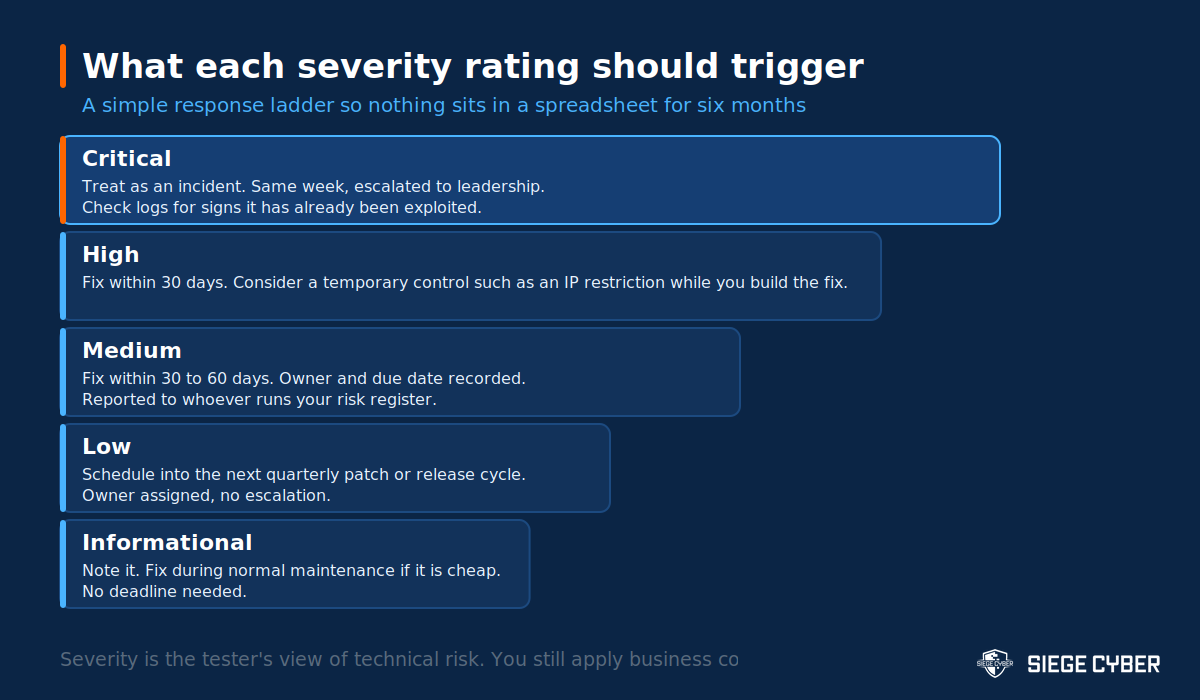
Most Australian providers rate findings as critical, high, medium, low or informational, and most base those ratings on CVSS, the Common Vulnerability Scoring System. CVSS scores a vulnerability from 0.0 to 10.0 based on how it can be exploited and what the impact is. Version 3.1 is still the most widely used, and version 4.0 is gradually being adopted.
Where the score stops helping
CVSS describes technical severity in the abstract. It does not know that the “medium” issue is on the system holding your entire customer database, or that the “high” is on a demo environment with fake data that is being decommissioned next month.
So take the tester’s rating as the starting point, then adjust for two things: what data or capability sits behind the affected system, and how exposed it is. An internet facing system with a medium rating usually deserves attention before an internal system with a high one. A tester who is willing to argue this through with you on a call is worth keeping.
The findings that are not vulnerabilities
Reports often include informational findings such as missing security headers, verbose error messages or outdated software with no known exploit. These are not urgent. Fold them into normal maintenance and do not let them crowd out the things that actually matter. A report where everything is urgent is a report nobody will action.
The first week after the report
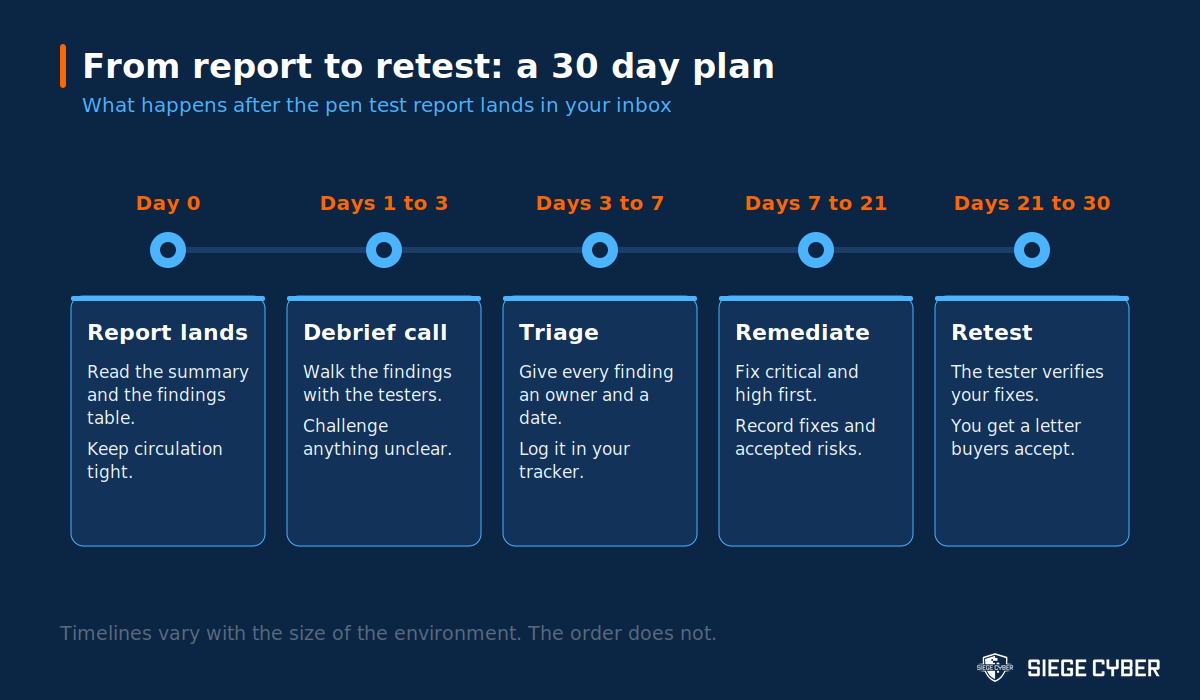
The gap between receiving a report and doing something about it is where most of the risk lives. Here is the sequence that works for small teams.
Book the debrief before you read every page
Almost every reputable provider includes a walkthrough call. Use it. Bring whoever will do the fixing, not just management. Ask the tester which two or three findings they would fix first if it were their business, and why. That single question usually reorders your list.
Give every finding an owner and a date
Copy the findings into whatever you already use, whether that is Jira, Asana or a spreadsheet. Every line gets a name and a due date. Findings without an owner do not get fixed, and “the IT team” is not an owner.
Keep the report on a short list
A penetration test report is a map of how to break into your business. Store it where access is controlled, share it under an NDA, and do not email it around the office. If a customer asks for evidence, most of the time an attestation letter or a summary is enough, and it is safer for both of you.
Remediation: fixing things in the right order
Work critical and high findings first, and resist the urge to knock over the easy low severity items just to make the list shorter. It feels productive and it is the most common way a remediation effort goes sideways.
When you cannot fix something quickly
Some findings need a rebuild, a vendor patch, or a change your team cannot make this quarter. That is normal. Put a compensating control in place while you wait: restrict access by IP address, turn on additional logging and alerting for that system, tighten the permissions of the accounts involved, or take the feature offline if it is not carrying revenue.
Write down what you did and why. That note is what you will hand an auditor or a customer who asks why the issue is still open.
Accepting a risk properly
Sometimes the honest answer is that the fix costs more than the risk justifies. Accepting a risk is a legitimate decision when it is made by someone with the authority to make it, recorded with a date and a reason, and reviewed later. Accepting it by saying nothing and hoping is not the same thing. If you hold ISO 27001, your risk register is exactly where this belongs.
Retesting: closing the loop
A retest is where the tester verifies that your fixes work and that you have not broken something else in the process. Most Australian providers include one retest within a defined window, commonly 30 to 90 days after the original test. Check what your engagement includes before you assume it is free.
What a retest does and does not cover
A retest usually re-examines the specific findings you say you have fixed. It is not a fresh test of the whole environment, and it will not pick up new problems introduced by unrelated changes. If your application has changed substantially since the original test, you need a new test, not a retest.
The letter your customers actually want
After a successful retest, ask for an attestation or summary letter. It states that a test was carried out, by whom, when, against what scope, and that the identified issues have been remediated. That one page satisfies most procurement teams and most insurers without exposing your technical detail. It is also the document to keep handy when you are answering SOC 2 and compliance questions.
Three things not to do with your report
- Do not treat a clean report as proof of security. It shows what a skilled person found in a fixed number of days, against a fixed scope, on a particular date.
- Do not use the report as a stick. If your developers feel blamed for findings, the next test will be quietly scoped smaller, and that helps nobody.
- Do not file it and wait a year. Your environment changes constantly, which is why testing on a sensible cycle matters more than the score on any single report.
Common questions
How long should a penetration testing report take to arrive?
Usually five to ten business days after testing finishes for a small to medium engagement. Anything critical should not wait for the report at all. A good tester will call you the same day they find something serious.
Who should see the full report?
Keep it to the people who need it: whoever owns remediation, your technical team, and your leadership. Customers and insurers should normally receive a summary or attestation letter instead. If a customer insists on the full report, send it under NDA and consider redacting the reproduction steps.
Is a report with no critical findings a good result?
It is a reasonable result, and it is worth checking the scope before you celebrate. A narrow scope produces fewer findings. Look at what was tested rather than only at the counts, and compare the scope with your vulnerability scanning coverage to see whether the two are measuring the same thing.
Do we have to fix everything before the retest?
No. Fix what you have decided to fix, tell the tester which findings are in scope for the retest, and be clear about which ones you have accepted or deferred. A retest that only covers three of nine findings is still useful, as long as the letter you receive says so accurately.
Turning your next report into fixed problems
The value of a penetration test is not in the document. It is in what changes in the four weeks afterwards. If your last report is still sitting unread, that is the cheapest security win available to you this month.
Siege Cyber is a CREST accredited Australian provider, and our penetration testing engagements are built around a debrief, a plain English report and a retest, so you finish with evidence you can hand to a customer. Have a look at our penetration testing services, or get in touch and we will talk through what your environment actually needs.
Siege Cyber is a CREST accredited company for penetration testing, working with businesses across Australia on fixed-price testing and compliance. Get a Fixed-Price Quote.