User Access Reviews: What Auditors Ask SaaS Teams For
A user access review is a periodic check that every active account in a system still belongs to a current person who still needs that level of access. Auditors do not ask to watch you do it. They ask for four artefacts: the user list you exported, the date you exported it, a record of who approved or revoked each account, and proof the revocations actually happened. A team of thirty with a dozen systems can produce all four in an afternoon, without buying anything.
Below is the process step by step, how often to run it for each type of system, and how the requirement is worded in ISO 27001 and SOC 2.
What is a user access review?
A user access review is a scheduled check in which the owner of a system looks at the list of accounts that can reach it and confirms, account by account, that each one is still needed at its current level. Accounts belonging to people who have left, changed role, or were granted temporary elevated access are removed or reduced.
It exists because access accumulates. A developer gets production read access for a migration and keeps it for two years. A contractor finishes and their account is disabled in the identity provider but not in the billing platform. A salesperson moves to support and gains permissions without losing the old ones. None of these is a breach, and all of them widen the blast radius of one stolen password.
How often should user access reviews be performed?
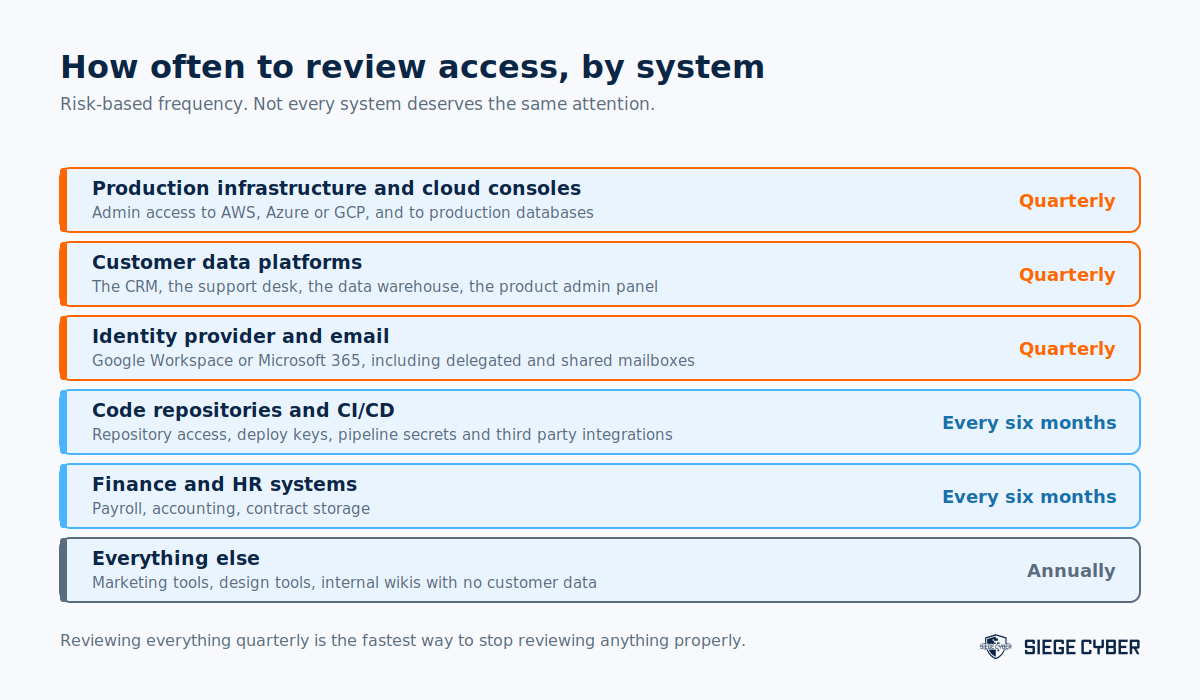
Quarterly for production infrastructure, customer data platforms and the identity provider. Every six months for code repositories, CI/CD, finance and HR systems. Annually for everything else. Reviewing every system quarterly sounds rigorous and is the fastest route to reviews that get rubber stamped.
Two events should trigger a review outside the schedule. The first is a departure, especially an involuntary one, where access should be removed the same day rather than waiting for the quarter. The second is a permission model change, such as a new role in the product or a migration to a new identity provider, which can silently grant access that nobody intended.
Whatever cadence you pick, write it down in your access control policy and then hold to it. An auditor comparing a policy that says quarterly against evidence of two reviews in eighteen months will raise a finding, where a policy saying every six months with matching evidence would have passed.
How does a small SaaS team run a user access review?
In five steps: export the user list from each system in scope, map every account to a current employee and role, have the system owner decide to approve, reduce or revoke each one, action the changes with a ticket, then file the evidence. No identity governance platform is required to do this properly at 20 to 100 people.
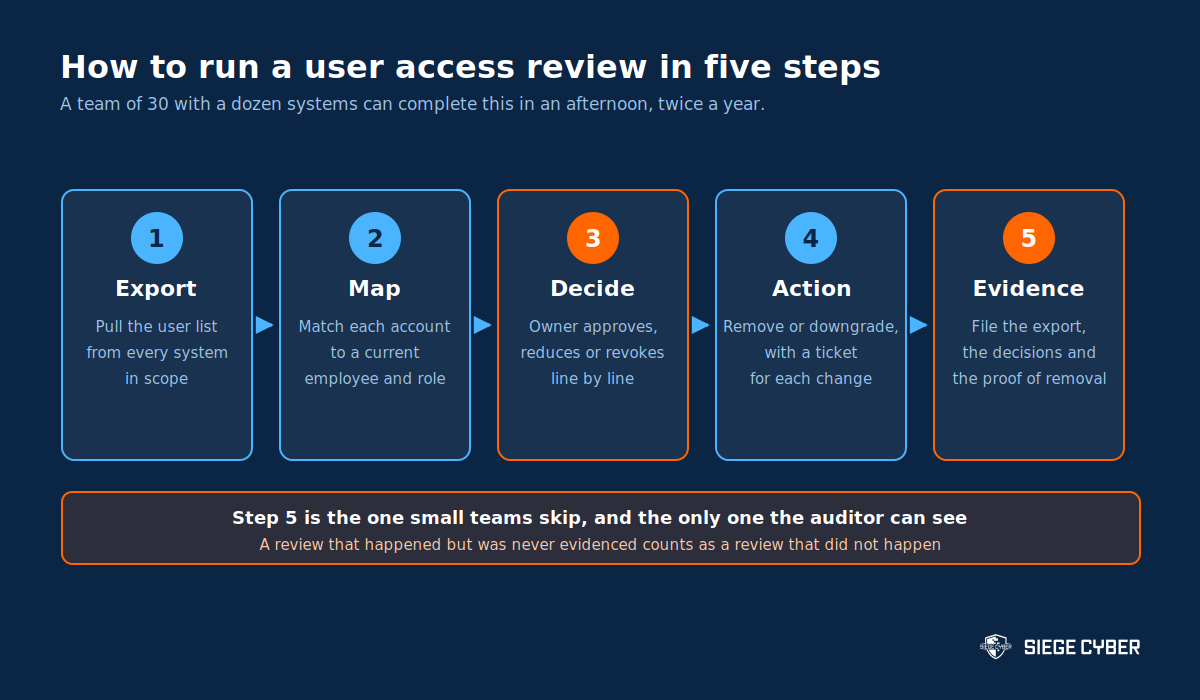
- Export. Pull the user list from every in-scope system on the same day, as CSV. Include role or permission level, last login date and whether MFA is enabled.
- Map. Join the exports against your current staff list. Anything that does not match a current person is either a service account, which needs a named owner, or an orphan, which needs removing.
- Decide. Send each system owner their own list. Ask for one of three decisions per row: keep, reduce, or revoke. Do not let a blanket approval stand in for line by line decisions.
- Action. Raise a ticket for every reduction and revocation so the change has a timestamp and an owner. Set a due date, usually five business days.
- Evidence. Save the original exports, the completed decision sheets, the tickets and a short summary noting who ran the review and when. Store them where you can find them a year later.
Two practical notes. Start with the identity provider, because a person removed there often still has standing access in tools that authenticate separately. And treat service accounts and API keys as in scope, since they usually hold broader permissions than any human account and nobody remembers creating them.
What evidence do auditors keep from a user access review?
Auditors keep the artefacts that prove the review was performed on a date, by a person with authority, with a decision recorded for each account and a consequence for the accounts that failed. A summary email saying access was reviewed and is appropriate is not evidence and will be rejected.
| Artefact | What it proves | Common failure |
|---|---|---|
| Raw user export with a date | The population reviewed, and when | Screenshot with no date or system name |
| Decision record per account | Someone judged each account individually | One approval covering the whole list |
| Named reviewer | The decision maker had authority over the system | Reviewed by the IT team generally |
| Tickets for removals | The decisions were carried out | Decisions recorded, removals never done |
| Post-removal confirmation | The account is actually gone | No follow-up export to confirm |
| Schedule and policy | This happens on a defined cadence | Evidence of one review only, before the audit |
The most common finding is not a missing review. It is a review where access was marked for removal and never removed. The follow-up export, taken a week later, is a cheap way to close that gap and it is the single artefact that most improves how the review reads.
Are user access reviews required for ISO 27001 and SOC 2?
Yes, in both. ISO 27001:2022 requires it in Annex A control 5.18, which says access rights are to be provided, reviewed, modified and removed in line with the organisation’s access control policy. SOC 2 covers the same ground in the common criteria for logical access, where periodic review of access is a standard tested control.
In Australia the standard is published as AS/NZS ISO/IEC 27001:2023, with identical control numbering to the 2022 international edition. For SOC 2 the criteria come from the AICPA SOC suite, and the examination tests whether the control operated throughout the report period, not whether it exists on paper.
The Essential Eight touches the same territory from a different angle. Its restrict administrative privileges strategy expects privileged access to be validated when it is requested and revalidated periodically rather than granted indefinitely. See the ASD Essential 8 requirements for how the strategies fit together.
Because a SOC 2 Type 2 tests operation across a period, missing one quarterly review inside a twelve month window is usually enough to generate an exception in the report. Our guide to preparing for a SOC 2 audit covers which controls are tested this way.
Is a user access review a preventive or a detective control?
A user access review is a detective control. It finds access that should not exist and then triggers a correction. The preventive controls sit either side of it: joiner, mover and leaver processes that grant the right access in the first place, and automated deprovisioning that removes it when someone leaves.
The distinction matters when you are deciding where to spend effort. If every review turns up the same twenty stale accounts, the review is working and the provisioning process is not. Fixing the offboarding runbook will do more for your risk than adding a fourth review a year.
What does this look like as your SaaS business grows?
Manual reviews using exports and a spreadsheet work well up to around 100 staff and 20 systems. Past that, the mapping step becomes the bottleneck and teams usually move to single sign-on for everything, then to tooling that automates the export and the reminder chase.
| Stage | Approach | What to fix first |
|---|---|---|
| Under 30 staff | Spreadsheet, twice a year, founder reviews | Get every system behind single sign-on |
| 30 to 100 staff | Quarterly for critical systems, owner per system | A written offboarding runbook with a same-day step |
| 100 plus staff | Automated export and reminders, owners still decide | Service accounts and API keys, which manual reviews miss |
Single sign-on is the highest leverage change at any size, because it collapses a dozen user lists into one and makes removal actually mean removal. If your product handles customer data for enterprise buyers, it is also one of the first things their security review asks about, alongside the compliance questions covered in SOC 2 for Australian SaaS companies.
Common questions
How often should user access reviews be performed?
Quarterly for production systems, customer data platforms and the identity provider. Every six months for code repositories, CI/CD, finance and HR. Annually for low risk tools. Add an out-of-cycle review whenever someone leaves or the permission model changes. Whatever you choose, match it to what your access control policy says.
Who should perform a user access review?
The owner of each system makes the decisions, because only they know whether a given person still needs that access. IT or security runs the process, gathers the exports, chases the responses and files the evidence. A review where IT decides on behalf of the business tends to approve everything.
Who is responsible for user access reviews?
Accountability sits with whoever owns information security in the business, often the CTO, operations lead or a virtual CISO. Responsibility for each individual decision sits with the system owner. Auditors want to see both: a named person who owns the programme, and a named person who signed off each system.
Is a user access review preventive or detective?
Detective. It identifies access that already exists and should not, then triggers removal. Preventive controls are the provisioning and deprovisioning processes around it. If reviews keep finding the same problems, the preventive controls are where the fix belongs.
Are user access reviews done for ISO or SOC audits?
Both. ISO 27001:2022 requires them through Annex A 5.18 on access rights, and a SOC 2 examination tests periodic access review as part of the logical access common criteria. The difference is that a SOC 2 Type 2 tests whether the review happened on schedule throughout the report period, so a missed quarter shows up as an exception.
How do you automate a user access review?
Start by putting every system behind single sign-on, which turns many user lists into one. Then script the exports and the reminders. Automating the decision itself is not the goal and auditors do not reward it, because the value of the control is a human confirming that a person still needs the access.
Making the review hold up
If you are preparing for a first SOC 2 or ISO 27001 audit, run the review now rather than the month before fieldwork. One clean review with proper evidence, repeated on schedule, is worth more than a rushed catch-up covering a year of missed quarters.
Siege Cyber helps Australian SaaS and startup teams build controls like this so they survive an audit and a customer security review. Learn more about our cyber security advisory services or get in touch.